> For the complete documentation index, see [llms.txt](https://sayonara.gitbook.io/writeups/llms.txt). Markdown versions of documentation pages are available by appending `.md` to page URLs; this page is available as [Markdown](https://sayonara.gitbook.io/writeups/ctf/nullcon-berlin-hackim-ctf-2023/web/zpr.md).

# zpr

zpr  is a web challenge from the Nullcon Berlin HackIM 2023 CTF

<div align="left"><figure><img src="https://1410593648-files.gitbook.io/~/files/v0/b/gitbook-x-prod.appspot.com/o/spaces%2FYI2noEqPw69jd0hR7Prp%2Fuploads%2F66EBIhuQBDBbPg4ilUML%2Fimage.png?alt=media&amp;token=a7f67ef0-1c08-4e8a-a466-ad975120e8a6" alt=""><figcaption></figcaption></figure></div>

download this challenge zip file&#x20;

{% file src="/files/MfO01CUf9toRaWhNt6Rk" %}

after reading the code it looks like the first website is for uploading zip files and the second one to view the the files uploaded (such as the files are in the path /tmp/data/hash) where the hash is the md5 hash of the zip filename

let's create a simple zip file and upload it

<div align="left"><figure><img src="https://1410593648-files.gitbook.io/~/files/v0/b/gitbook-x-prod.appspot.com/o/spaces%2FYI2noEqPw69jd0hR7Prp%2Fuploads%2FJnXTJuwTqiJMhkvSvnC6%2Fimage.png?alt=media&amp;token=65bb4f3a-3d20-4df9-aeba-523821a0cda3" alt=""><figcaption></figcaption></figure></div>

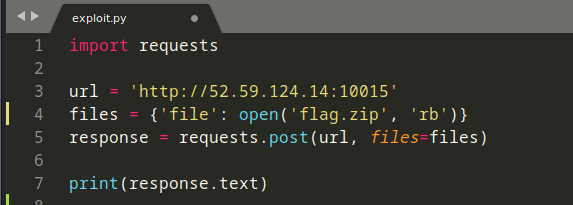
to upload this zip file we will use a simple request script

<div align="left"><figure><img src="https://1410593648-files.gitbook.io/~/files/v0/b/gitbook-x-prod.appspot.com/o/spaces%2FYI2noEqPw69jd0hR7Prp%2Fuploads%2FKh7k2DpEC9txJj6mIgl6%2Fimage.png?alt=media&amp;token=943cddc2-7f26-4dfb-9497-3382c4652b24" alt=""><figcaption></figcaption></figure></div>

<div align="left"><figure><img src="https://1410593648-files.gitbook.io/~/files/v0/b/gitbook-x-prod.appspot.com/o/spaces%2FYI2noEqPw69jd0hR7Prp%2Fuploads%2FEcyU4Ov3pBgJOC9h9B3p%2Fimage.png?alt=media&amp;token=5ba0cbc2-25fa-4b71-a7a8-5b6de33722a6" alt=""><figcaption></figcaption></figure></div>

and this is the second website where we can view our files that we have uploaded in the first website

<div align="left"><figure><img src="https://1410593648-files.gitbook.io/~/files/v0/b/gitbook-x-prod.appspot.com/o/spaces%2FYI2noEqPw69jd0hR7Prp%2Fuploads%2FeiRTzuCDbCdaMnnirr5P%2Fimage.png?alt=media&amp;token=113dba9e-eb72-4c1c-aeb2-fda3b9395974" alt=""><figcaption></figcaption></figure></div>

## <mark style="color:red;">Exploitation</mark>&#x20;

we know that the flag is in the root directory but we can view only files that exist in the /tmp/data/ path, to exploit this we will create a symlink to the flag that exists in the root directory and upload it once it's extracted it will point to the flag and get its content&#x20;

<div align="left"><figure><img src="https://1410593648-files.gitbook.io/~/files/v0/b/gitbook-x-prod.appspot.com/o/spaces%2FYI2noEqPw69jd0hR7Prp%2Fuploads%2FaDHvLYejDpGxvlmLZWuM%2Fimage.png?alt=media&amp;token=9bc890ef-c45f-4c6c-9d5a-482c750ced33" alt=""><figcaption></figcaption></figure></div>

now let's zip it using --symlink to store the symbolic link we have created&#x20;

<div align="left"><figure><img src="https://1410593648-files.gitbook.io/~/files/v0/b/gitbook-x-prod.appspot.com/o/spaces%2FYI2noEqPw69jd0hR7Prp%2Fuploads%2FX6VNpmLPiXYf1qYxBsw5%2Fimage.png?alt=media&amp;token=6b5c9128-c15f-4f9e-a4be-c24b41ffe7fd" alt=""><figcaption></figcaption></figure></div>

let's upload this zip that stores the symbolic link

<div align="left"><figure><img src="https://1410593648-files.gitbook.io/~/files/v0/b/gitbook-x-prod.appspot.com/o/spaces%2FYI2noEqPw69jd0hR7Prp%2Fuploads%2FqnBPrxrU01FUppMQMv69%2Fimage.png?alt=media&amp;token=183230f2-8372-4305-9e65-a07bfd409bfb" alt=""><figcaption></figcaption></figure></div>

<div align="left"><figure><img src="https://1410593648-files.gitbook.io/~/files/v0/b/gitbook-x-prod.appspot.com/o/spaces%2FYI2noEqPw69jd0hR7Prp%2Fuploads%2F8YdGxqfJIQHTzbS3I8Jt%2Fimage.png?alt=media&amp;token=59f5097d-fcc6-4346-a912-8e19996d66de" alt=""><figcaption></figcaption></figure></div>

let's open the link

<div align="left"><figure><img src="https://1410593648-files.gitbook.io/~/files/v0/b/gitbook-x-prod.appspot.com/o/spaces%2FYI2noEqPw69jd0hR7Prp%2Fuploads%2FAQl3B00jjquN39IB71Kb%2Fimage.png?alt=media&amp;token=8a98a11b-4fa3-4da4-b55f-74f4c7532c0d" alt=""><figcaption></figcaption></figure></div>

let's open this flag file and BOOM we've got the flag

<div align="left"><figure><img src="https://1410593648-files.gitbook.io/~/files/v0/b/gitbook-x-prod.appspot.com/o/spaces%2FYI2noEqPw69jd0hR7Prp%2Fuploads%2FHNHoBOG0NqUVE44zcFme%2Fimage.png?alt=media&amp;token=b42c1b38-3b87-4991-b19d-e836a37d6187" alt=""><figcaption></figcaption></figure></div>

so the idea here is upload a symlink that points to the flag file&#x20;